
Order Group · 2023
Designing two products around one restaurant operation

Role
Product Designer, Researcher + Strategist
Duration
1 Year
Responsibilities
UX Research
UX Design
Business Strategy
Product Strategy
Tools
Figma
Miro
Airtable
Context
A three-person startup building a connected POS and Restaurant Portal
Order Group was a 0→1 venture creating new software for restaurant operations. There was no existing product or established design practice: the founder, one software engineer and I were defining the proposition while building it.
As the sole designer and researcher for most of the project, my role extended from field research and product strategy into interaction design, UI, implementation review and design QA.
The problem
Restaurant service was being held together by disconnected tools
Waiters moved between tables and fixed terminals. Managers maintained menus, staff access and devices through separate systems. Kitchens relied on tickets, printers and verbal updates.
The opportunity was not simply to design a better till. It was to connect the people serving customers with the people configuring and supporting that service.
On the restaurant floor
Staff moved between tables and fixed terminals, navigated dense interfaces, and repeated steps during time-sensitive service.
Behind the scenes
Managers maintained menus, staff access and devices through disconnected systems, creating extra administration and increasing the risk of errors.
Interviews and restaurant observation shifted the brief from “design a simpler POS” to a connected operational model. The real opportunity sat in reducing the handoffs between service and management.
Product strategy
One operation, split across two products
We divided the experience by context rather than trying to force every task into one interface.

The strategic decision was not “mobile or desktop.” It was where each task should live, how the products should connect, and what the first release could realistically support.
On-site Discovery
Experiencing service first-hand before designing the interface
Through restaurant visits and interviews with waiters and managers, I observed how existing POS systems affected daily work. This exposed how fixed terminals, complex workflows and disconnected tools slowed service and created operational bottlenecks.

Directional findings from timed restaurant observations—not post-launch performance measures
33 interviews revealed two sides of the same problem
18
Floor teams
Waiters and head waiters

Complex interfaces slowed service.

Downtime forced teams into manual work.

High turnover made onboarding difficult.
15
Management teams
AGMs, GMs and managers
Menu changes relied on disconnected systems.

Rigid interfaces disrupted established workflows.
Poor integration caused kitchen miscommunication.
MVP design and testing
Three tests shaped the product
Before full development, we tested an interactive MVP with 26 waiters and managers. Their feedback helped us refine usability, workflows and real-world interactions.

Point of sale
Restaurant Portal
01
A layout that worked across devices
An early preference for horizontal layouts changed when tested with hospitality staff.
Decision
Use a split structure that could adapt across terminal and mobile screens.
02
Faster ordering without losing familiarity
Shortcuts were preferred by 6 of 10 participants, while 4 preferred colour tiers.
Decision
Combine familiar categories with shortcuts for frequent actions.
03
Menu management without fragmented workflows
Seven of eight participants preferred visible menu navigation, while six preferred contextual pop-ups.
Decision
Keep the menu structure visible and open detailed controls in context.
Final product
One connected system for service and operations
The final product paired a fully functional POS with a coded Restaurant Portal. The POS supported ordering, modifiers, payments, mobile use and kitchen printing, and was piloted in one restaurant for six months. The Portal connected menu, staff, device, receipt and reporting controls, but had not yet reached a live pilot.
Keeping service moving for the POS

Ordering stays on one screen
The POS keeps the active order, menu categories, items and frequent actions visible together. Staff can add or modify items, assign them to seats and send the order without moving through disconnected screens.

01 - Receipts
Receipts remain easy to find and manage
Staff can review previous orders, check payment details and quickly print, void or reopen a receipt without leaving the service workflow.

02 - Modify
Modifications stay connected to the order
Staff can adjust quantities, add modifiers and record customer requests without leaving the active order, reducing unnecessary steps during busy service.

03 - Pay
Four ways to split the bill
Staff can keep one bill or divide it by seat, equally or manually. Each option remains within the same payment flow, making different customer requests easier to manage.
Keeping operations connected for the Portal

Sales performance at a glance
Managers can review sales, discounts, refunds, service charges and tips, compare performance across periods, and export reports from one page.

01 - Select
Control when menus are available
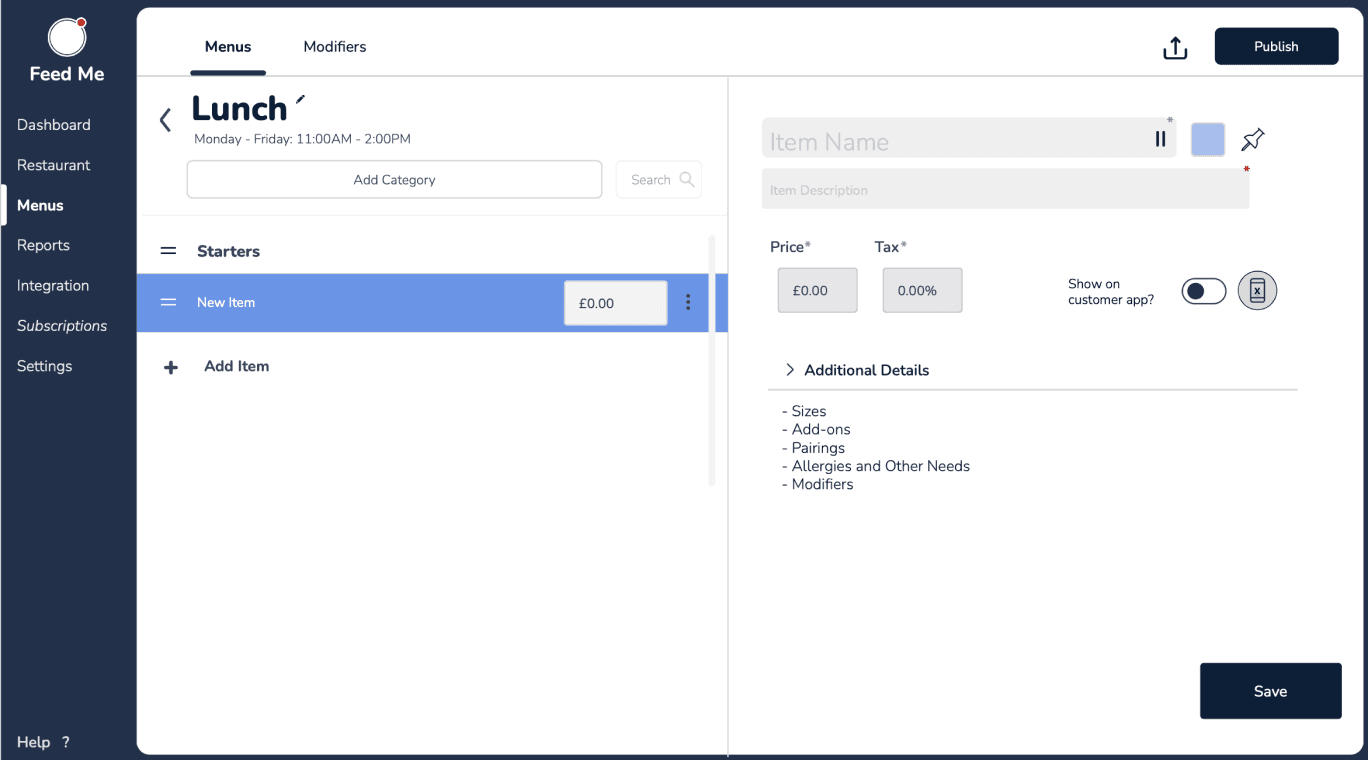
Managers can create multiple menus, set their active hours and move each one between draft, published and offline states.

02 - Customise
Edit an entire menu in one place
Categories, items, prices and modifiers remain visible together, allowing managers to make changes without moving through disconnected screens.

03 - Control
Manage devices and staff access
Managers can monitor connected POS devices, check their status and manage staff accounts, roles and access codes from one central settings area.
Pilot and Outcome
From coded product to live restaurant service
The fully functional POS was piloted in one restaurant for six months, including handheld ordering and kitchen-printer functionality. I worked with the engineer to review the coded experience and ran design-led QA throughout delivery.
1 Restaurant
Live hospitality environment
6 Months
POS pilot duration
Tested
Terminal and mobile ordering with kitchen printing
The pilot moved the POS beyond prototype testing into live restaurant use. The Portal remained semi-functional and unpiloted; longer-term adoption and commercial impact were not measured before I left.
Reflection
This project showed me that innovation comes from understanding existing workflows, then challenging the right assumptions without losing what users already know.
Context
A three-person startup building a connected POS and Restaurant Portal
Order Group was a 0→1 venture creating new software for restaurant operations. There was no existing product or established design practice: the founder, one software engineer and I were defining the proposition while building it.
As the sole designer and researcher for most of the project, my role extended from field research and product strategy into interaction design, UI, implementation review and design QA.
The problem
Restaurant service was being held together by disconnected tools
Waiters moved between tables and fixed terminals. Managers maintained menus, staff access and devices through separate systems. Kitchens relied on tickets, printers and verbal updates.
The opportunity was not simply to design a better till. It was to connect the people serving customers with the people configuring and supporting that service.
On the restaurant floor
Staff moved between tables and fixed terminals, navigated dense interfaces, and repeated steps during time-sensitive service.
Behind the scenes
Managers maintained menus, staff access and devices through disconnected systems, creating extra administration and increasing the risk of errors.
Interviews and restaurant observation shifted the brief from “design a simpler POS” to a connected operational model. The real opportunity sat in reducing the handoffs between service and management.
Product strategy
One operation, split across two products
We divided the experience by context rather than trying to force every task into one interface.
The strategic decision was not “mobile or desktop.” It was where each task should live, how the products should connect, and what the first release could realistically support.
On-site Discovery
Experiencing service first-hand before designing the interface
Through restaurant visits and interviews with waiters and managers, I observed how existing POS systems affected daily work. This exposed how fixed terminals, complex workflows and disconnected tools slowed service and created operational bottlenecks.
Directional findings from timed restaurant observations—not post-launch performance measures
33 interviews revealed two sides of the same problem
18
Floor teams
Waiters and head waiters
Complex interfaces slowed service.
Downtime forced teams into manual work.
High turnover made onboarding difficult.
15
Management teams
AGMs, GMs and managers
Menu changes relied on disconnected systems.
Rigid interfaces disrupted established workflows.
Poor integration caused kitchen miscommunication.
MVP design and testing
Three tests shaped the product
Before full development, we tested an interactive MVP with 26 waiters and managers. Their feedback helped us refine usability, workflows and real-world interactions.
Point of sale
Restaurant Portal
01
A layout that worked across devices
An early preference for horizontal layouts changed when tested with hospitality staff.
Decision
Use a split structure that could adapt across terminal and mobile screens.
02
Faster ordering without losing familiarity
Shortcuts were preferred by 6 of 10 participants, while 4 preferred colour tiers.
Decision
Combine familiar categories with shortcuts for frequent actions.
03
Menu management without fragmented workflows
Seven of eight participants preferred visible menu navigation, while six preferred contextual pop-ups.
Decision
Keep the menu structure visible and open detailed controls in context.
Final product
One connected system for service and operations
The final product paired a fully functional POS with a coded Restaurant Portal. The POS supported ordering, modifiers, payments, mobile use and kitchen printing, and was piloted in one restaurant for six months. The Portal connected menu, staff, device, receipt and reporting controls, but had not yet reached a live pilot.
Keeping service moving for the POS
Ordering stays on one screen
The POS keeps the active order, menu categories, items and frequent actions visible together. Staff can add or modify items, assign them to seats and send the order without moving through disconnected screens.
01 - Receipts
Receipts remain easy to find and manage
Staff can review previous orders, check payment details and quickly print, void or reopen a receipt without leaving the service workflow.
02 - Modify
Modifications stay connected to the order
Staff can adjust quantities, add modifiers and record customer requests without leaving the active order, reducing unnecessary steps during busy service.
03 - Pay
Four ways to split the bill
Staff can keep one bill or divide it by seat, equally or manually. Each option remains within the same payment flow, making different customer requests easier to manage.
Keeping operations connected for the Portal
Sales performance at a glance
Managers can review sales, discounts, refunds, service charges and tips, compare performance across periods, and export reports from one page.
01 - Select
Control when menus are available
Managers can create multiple menus, set their active hours and move each one between draft, published and offline states.
02 - Customise
Edit an entire menu in one place
Categories, items, prices and modifiers remain visible together, allowing managers to make changes without moving through disconnected screens.
03 - Control
Manage devices and staff access
Managers can monitor connected POS devices, check their status and manage staff accounts, roles and access codes from one central settings area.
Pilot and Outcome
From coded product to live restaurant service
The fully functional POS was piloted in one restaurant for six months, including handheld ordering and kitchen-printer functionality. I worked with the engineer to review the coded experience and ran design-led QA throughout delivery.
1 Restaurant
Live hospitality environment
6 Months
POS pilot duration
Tested
Terminal and mobile ordering with kitchen printing
The pilot moved the POS beyond prototype testing into live restaurant use. The Portal remained semi-functional and unpiloted; longer-term adoption and commercial impact were not measured before I left.
Reflection
This project showed me that innovation comes from understanding existing workflows, then challenging the right assumptions without losing what users already know.
Context
A three-person startup building a connected POS and Restaurant Portal
Order Group was a 0→1 venture creating new software for restaurant operations. There was no existing product or established design practice: the founder, one software engineer and I were defining the proposition while building it.
As the sole designer and researcher for most of the project, my role extended from field research and product strategy into interaction design, UI, implementation review and design QA.
The problem
Restaurant service was being held together by disconnected tools
Waiters moved between tables and fixed terminals. Managers maintained menus, staff access and devices through separate systems. Kitchens relied on tickets, printers and verbal updates.
The opportunity was not simply to design a better till. It was to connect the people serving customers with the people configuring and supporting that service.
On the restaurant floor
Staff moved between tables and fixed terminals, navigated dense interfaces, and repeated steps during time-sensitive service.
Behind the scenes
Managers maintained menus, staff access and devices through disconnected systems, creating extra administration and increasing the risk of errors.
Interviews and restaurant observation shifted the brief from “design a simpler POS” to a connected operational model. The real opportunity sat in reducing the handoffs between service and management.
Product strategy
One operation, split across two products
We divided the experience by context rather than trying to force every task into one interface.
The strategic decision was not “mobile or desktop.” It was where each task should live, how the products should connect, and what the first release could realistically support.
On-site Discovery
Experiencing service first-hand before designing the interface
Through restaurant visits and interviews with waiters and managers, I observed how existing POS systems affected daily work. This exposed how fixed terminals, complex workflows and disconnected tools slowed service and created operational bottlenecks.
Directional findings from timed restaurant observations—not post-launch performance measures
33 interviews revealed two sides of the same problem
18
Floor teams
Waiters and head waiters
Complex interfaces slowed service.
Downtime forced teams into manual work.
High turnover made onboarding difficult.
15
Management teams
AGMs, GMs and managers
Menu changes relied on disconnected systems.
Rigid interfaces disrupted established workflows.
Poor integration caused kitchen miscommunication.
MVP design and testing
Three tests shaped the product
Before full development, we tested an interactive MVP with 26 waiters and managers. Their feedback helped us refine usability, workflows and real-world interactions.
Point of sale
Restaurant Portal
01
A layout that worked across devices
An early preference for horizontal layouts changed when tested with hospitality staff.
Decision
Use a split structure that could adapt across terminal and mobile screens.
02
Faster ordering without losing familiarity
Shortcuts were preferred by 6 of 10 participants, while 4 preferred colour tiers.
Decision
Combine familiar categories with shortcuts for frequent actions.
03
Menu management without fragmented workflows
Seven of eight participants preferred visible menu navigation, while six preferred contextual pop-ups.
Decision
Keep the menu structure visible and open detailed controls in context.
Final product
One connected system for service and operations
The final product paired a fully functional POS with a coded Restaurant Portal. The POS supported ordering, modifiers, payments, mobile use and kitchen printing, and was piloted in one restaurant for six months. The Portal connected menu, staff, device, receipt and reporting controls, but had not yet reached a live pilot.
Keeping service moving for the POS
Ordering stays on one screen
The POS keeps the active order, menu categories, items and frequent actions visible together. Staff can add or modify items, assign them to seats and send the order without moving through disconnected screens.
01 - Receipts
Receipts remain easy to find and manage
Staff can review previous orders, check payment details and quickly print, void or reopen a receipt without leaving the service workflow.
02 - Modify
Modifications stay connected to the order
Staff can adjust quantities, add modifiers and record customer requests without leaving the active order, reducing unnecessary steps during busy service.
03 - Pay
Four ways to split the bill
Staff can keep one bill or divide it by seat, equally or manually. Each option remains within the same payment flow, making different customer requests easier to manage.
Keeping operations connected for the Portal
Sales performance at a glance
Managers can review sales, discounts, refunds, service charges and tips, compare performance across periods, and export reports from one page.
01 - Select
Control when menus are available
Managers can create multiple menus, set their active hours and move each one between draft, published and offline states.
02 - Customise
Edit an entire menu in one place
Categories, items, prices and modifiers remain visible together, allowing managers to make changes without moving through disconnected screens.
03 - Control
Manage devices and staff access
Managers can monitor connected POS devices, check their status and manage staff accounts, roles and access codes from one central settings area.
Pilot and Outcome
From coded product to live restaurant service
The fully functional POS was piloted in one restaurant for six months, including handheld ordering and kitchen-printer functionality. I worked with the engineer to review the coded experience and ran design-led QA throughout delivery.
1 Restaurant
Live hospitality environment
6 Months
POS pilot duration
Tested
Terminal and mobile ordering with kitchen printing
The pilot moved the POS beyond prototype testing into live restaurant use. The Portal remained semi-functional and unpiloted; longer-term adoption and commercial impact were not measured before I left.
Reflection
This project showed me that innovation comes from understanding existing workflows, then challenging the right assumptions without losing what users already know.
Have a new project or just want to say hi!
Feel free to reach out to me.
© 2026 - Marcus Ostler
Like any product this portfolio website will continue to evolve. Please check back regularly!
(V1.15)